

Assessment & Feedback
In recent years, generative AI technologies have revolutionised various aspects of education and assessment. Among these advancements, the use of generative AI chatbots for formulating assessment questions has emerged as a promising tool to streamline the question creation process, enhance engagement, and improve the quality of assessments. By leveraging the capabilities of these AI chatbots, educators can efficiently generate diverse and tailored sets of assessment questions across different subjects and levels of complexity.
This section provides pointers and suggestions for instructors who are keen to explore how Generative AI chatbots can assist in the formulation of assessment questions.
🔒 Important Note for SMU Instructors
Regardless of the tool(s) used, instructors remain responsible for ensuring that assessments are constructively aligned, valid, reliable, fair, and in line with SMU assessment policy. For details on the SMU assessment policy, please click HERE.
Note also that, while this page focuses on Multiple Choice Questions (MCQ) and Essay questions for Final Exams, instructors can also apply these pointers and suggestions to other assessments.
Getting started
Generative AI chatbots are at their most helpful when users can clearly define and articulate their objectives and the relevant context and factors. Hence, it is important that instructors exercise due diligence in planning and clarifying key information such as the learning objectives, assessment type, degree of difficulty for students that is aligned to course requirements. For more information on assessment planning and design, please refer to our page on setting quizzes and exams.
- Define Learning objectives
Determine the knowledge and skills you want to assess. This is the starting point for crafting the prompt that you will submit to the chatbot. Consider using verbs from the Blooms' Revised Taxonomy to help state what students are to demonstrate. - Prepare your training materials
Feed the chatbot relevant course materials like lectures, notes, textbooks, and past exams. If your course refers to important and well-known works and concepts, specifying these would suffice without needing to insert the entire source. The more relevant data you provide, the better Generative AI chatbots can tailor questions to your needs. - Determine types of Assessment Questions
Identify the types of assessment questions (MCQ, short answer questions, essays, etc) that you would like to incorporate in your assessment. You could even set the difficulty level by specifying whether you want easy, medium, or challenging questions.
🔒 For SMU Instructors
Do ensure your inputs and generated outputs are in line with SMU assessment policy (Click HERE for details)
Picking a chatbot
The Generative AI landscape is advancing rapidly, with new models and tools constantly emerging. Companies across the industry are continually making significant leaps in capability, so the “best” option can shift quickly. Rather than worrying about selecting the perfect chatbot from the start, it’s often more helpful to explore a few different tools to see which ones align best with your needs and workflow. Over time, this hands-on familiarity will make it easier to choose and adapt as the technology continues to evolve.
Here are some chatbots you can consider:
General Chatbots | Responses Grounded in Sources | |||
ChatGPT | Claude | Gemini | Perplexity | NotebookLM |





Creating high-quality prompts
Success in using Generative AI chatbots is determined to a significant degree by the quality of the prompt provided. Here are some guidelines to create better prompts:
- When choosing the model to work with, ensure that an appropriate model is selected. While more recent models usually perform better, some of these are highly specialised to perform well in specific types of tasks.
- Start with a simple and short prompt, and iterate from there.
- Keep crucial instructions at the start or end of long prompts. When processing lengthy prompts, the model may employ certain techniques that make it more attentive to the beginning and ending of your prompt than to the middle. Place primary instructions such as the task description, constraints, tone/style, and output format at the start of the prompt and reinforce crucial points at the end of the prompt.
- Provide instructions and input text (content to be processed, such as information required for the task) in distinct sections within your prompt to avoid ambiguity.
- Be specific and descriptive about the task and the desired outcome - its format, length, style, language, etc.
- Avoid ambiguous descriptions and instructions.
- Favor instructions that say “what to do” instead of those that say “what not to do”.
- Guide the chatbot’s response by including instructions in your prompt on what the output should look like. This could be the first word, first sentence, or overall format of the output.
- Use advanced techniques like Few-shot prompting and Chain-of-thought
- Test your prompts with different models to assess their robustness.
- Version and track the performance of your prompts.
When using generative AI chatbots, exercise care in checking and using the outputs, as responses from chatbots such as ChatGPT can contain inaccuracies, made-up sources and content, and offensive material. While these prompting guidelines support strong results in general, some situations may call for a different approach altogether.
Do also note that copyright principles and intellectual property rights apply in your inputs to the generative AI chatbots. Possible infringements include the feeding of copyrighted materials such as textbooks, articles, pictures, etc. For copyright concerns and advisory, please seek SMU Libraries support by clicking HERE.
Refining and finalising your questions
Generative AI chatbots can be powerful tools for generating diverse and thought-provoking assessment questions, but human oversight and guidance are still essential for ensuring the questions are tailored to your specific learning objectives.
The following are some tips that may be helpful in refining and checking the outputs:
- Have the chatbot list its sources and then validate them by opening the actual references or comparing the information against reliable databases, textbooks, or institutional materials. Human review remains essential.
- Refine a generated question by requesting variations, specifying aspects of the questions you would like to change.
- Iterate on smaller subsets of questions, or even single questions. This is likely to produce better results than trying to improve everything simultaneously.
- Input questions you have used for an exam before and ask the tool to generate a different question.
Concluding thoughts on using generative AI chatbots for assessments
Generative AI chatbots can be powerful tools for generating diverse and thought-provoking assessment questions, but human oversight and guidance are still essential for ensuring the questions are tailored to your specific learning objectives.
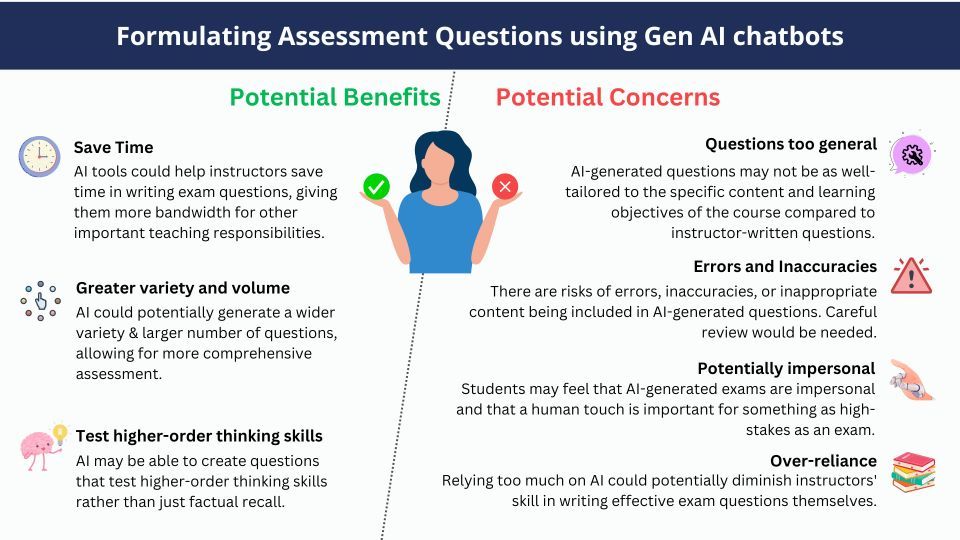
Overall, if AI tools are used carefully and questions are thoroughly reviewed, they could potentially be a helpful supplementary tool for busy professors. However, fully outsourcing exam creation to AI is risky. At most, AI should assist and inspire human question-writing, not replace it.
Human judgment, subject matter expertise, and understanding of the nuances of the course material should be central in the exam development process. Technology can assist, but should not be the sole author of something as important as exam questions.
The information here is current as of Dec 2025. Due to the evolving nature of emerging technologies and their impact, we will be periodically updating this page with new information and tips, so do check back.