

The DRIVE protocol supports the handling of suspected unauthorised AI use. It should be used where concerns arise, but detection-based approaches should not be the primary assessment strategy. Instructors are encouraged to prioritise assessment designs that adapt to or incorporate AI use, while preserving the intended learning outcomes and assessment integrity.
In cases where the unauthorised use of generative AI tools in assessments is suspected, SMU instructors should follow the DRIVE protocol, detailed below.
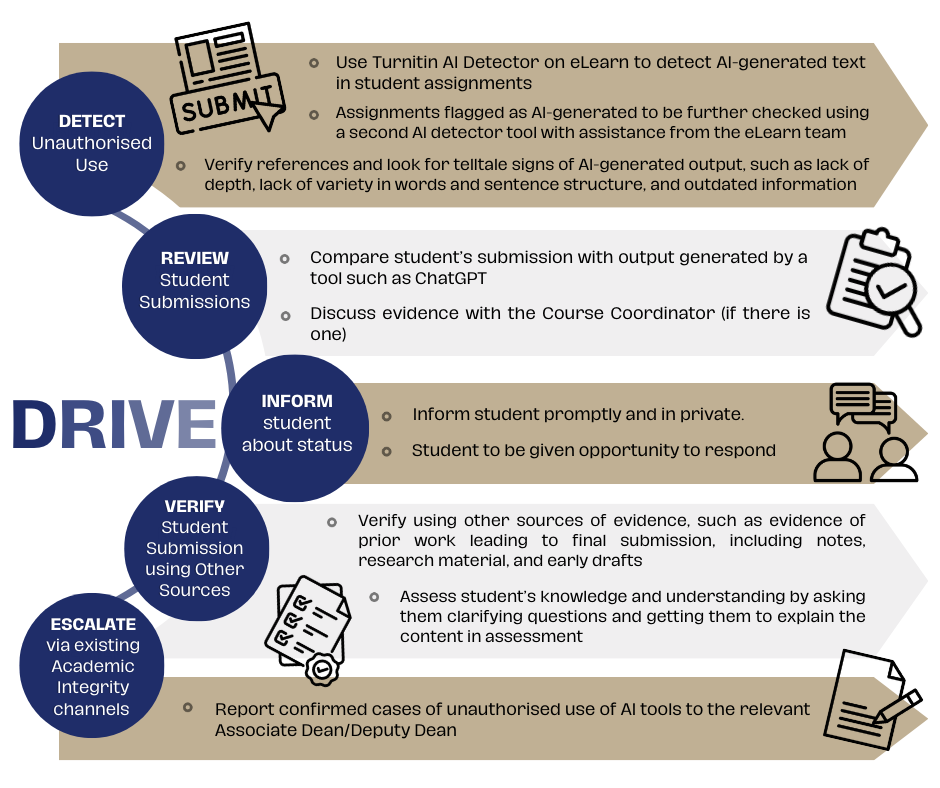
DETECT unauthorised use
Instructors apply AI detection tools to identify assignments with AI-generated content
Instructors submit student assignments to Turnitin AI Detection function. Enable Similarity Report” in your Assignment Setting - Evaluation and Feedback, to detect AI-generated text in student assignments.
Assignments flagged as AI-generated (> 20%) should be further checked using a second AI detector tool, such as GPTZero or Originality.AI. IITS' eLearn team will assist in conducting these checks, using the appropriate licences for these tools.
- If the second detection tool produces a similar output and parts in the submission highlighted by Turnitin are also flagged by the second detection tool, further investigation should be carried out.
- If the second detection tool produces a different output, instructors have the discretion to use another tool, investigate further or give student the benefit of doubt.
REVIEW student submissions
Instructors review identified assignments with AI-generated content in greater detail
Review the AI detection tool report and compare student’s paper with the copied source(s). Instructors may also generate an answer using an AI tool like ChatGPT and compare it to the student’s submission for similarities.
If available, compare the student's assignment with previous submissions. Proactively conduct random checks on content and cross-checking references with websites like ‘Google Scholar’ and SMU Libraries’ databases.
Consult the Course Coordinator, if there is one, to go through submissions together.
INFORM students about status
Instructors communicate with students about the current situation and allow them to respond
Inform the student promptly and in private. Do offer them an opportunity to explain their position.
Guiding question: 'The output from the AI-detection tools suggests that some of your work was AI-generated. I have also independently checked additional examples of AI-generated responses. Are you able to explain why your detection tool output score is so high?'
VERIFY student submission using other sources
Instructors consult further sources of evidence, including those provided by students
Meet with the student and let him/her know your specific concerns and allow the student to run through evidence of prior work done. Require the student to produce evidence of prior work done leading to final submission. Evidence includes notes, research materials, outlines, and drafts. For submissions that test computational skills, such as financial accounting calculations or coding, ask the student to show workings and explain the steps.
ESCALATE via existing academic integrity channels
Instructors report confirmed cases of unauthorised use
Report the incident to the representative of your school (Deputy Dean or an Associate Dean). Follow established procedures for violations of the Code of Academic Conduct.